The Tao of Leela - User Manual
Prototype edition | Updated for the current journey on 14 October 2026.
Play at play.leela.day. This manual describes the guided journey interface. If you are running the project yourself, use the setup instructions in the Developer Manual (in the source repository).
Contents
- Understand the game
- Choose the right entrance
- Sign in and create a Persona
- Complete your first encounter
- Read the casting and movement
- Pause, save and resume
- Manage Personas and history
- Understand AI and your information
- Solve common problems
- Know the current limits
1. Understand the game
Tao of Leela brings a symbolic board, I Ching castings and reflection into one continuing experience. You guide a constructed character through encounters and observe the history that develops.
| Term | Meaning in the game |
|---|---|
| Player | You, the person operating the application and making choices. |
| Persona | A character or situated point of view that you construct and guide. |
| Journey | That Persona's saved position, questions, castings and reflections. |
| Avatar | A visual representation of the Persona; the current form accepts a description. |
| Leela Field | The shared symbolic setting, represented by 72 board states. |
| Casting | The six-line I Ching result produced through the yarrow procedure. |
| Hexagram | A pattern of six Yin or Yang lines. |
| Changing line | A line that transforms into its opposite in the resulting hexagram. |
| Reflection | Your recorded response to an encounter. |
| Theme | An evidence-supported narrative pattern, when observations have been recorded. |
A Persona can resemble you, differ entirely from you, or be an archetypal figure. Its age, health, resources or worldview are not assertions about you. You can create several Personas without combining their histories.
The game offers material for contemplation. You decide what it means and whether a proposed interpretation is useful.
The journey at a glance
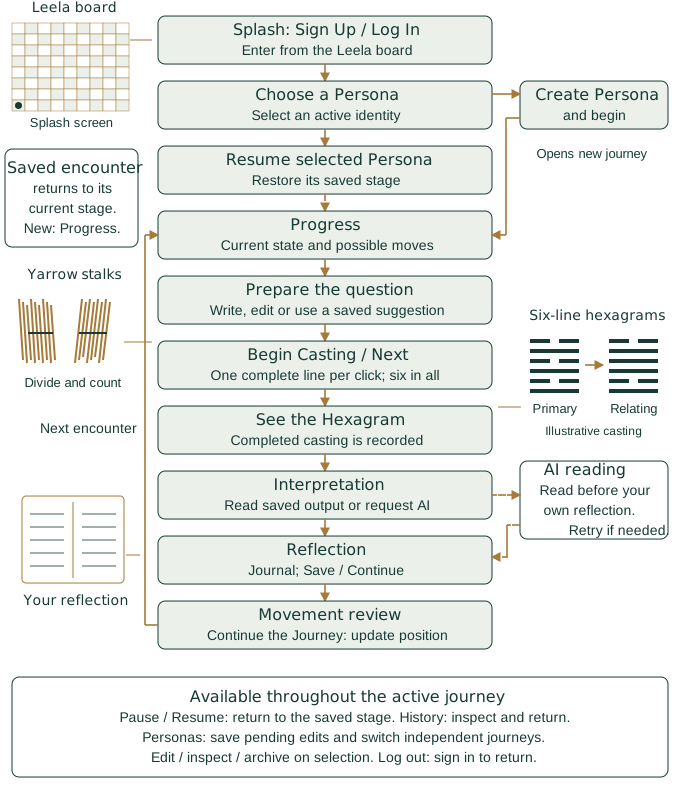
The diagram shows the live /journey/ interface, with schematic board, yarrow,
hexagram and journal illustrations. Resume restores the selected
Persona's saved stage; it does not restart an unfinished encounter. The guided flow requests an AI reading before personal reflection. The board position updates only when movement is acknowledged.
Pause, History and switching Personas preserve the accepted journey state.
2. Choose the right entrance
Use the address provided by your installation's operator, followed by the path
below. For a default local installation the base address is http://localhost:8080.
| Path | Purpose | What is saved? |
|---|---|---|
/journey/ |
Guided, authenticated Persona journeys. Start here. | Accepted journey actions are saved on the server. |
/journey/?demo&scenario=ordinary#splash |
Labelled development preview with example encounters. | Preview state in this browser tab's session storage, not a live account. |
/yarrow/ |
Standalone casting demonstration. | A local browser snapshot; no Persona journey event. |
/ |
Opens the guided interface at /journey/. |
Same server persistence as the guided interface. |
/?prototype |
Earlier diagnostic controls for unfinished prototype casts. | Uses the selected Persona's server journey with the older encounter flow. |
The preview's Reset example resets preview data only. Demonstrations containing snakes, ladders or completion are presentation fixtures. Live snakes and ladders now follow the board endpoints; the completion fixture is not a live terminal rule. Use the guided interface consistently during an encounter. An unfinished casting started in the earlier prototype may need to be finished there first.
3. Sign in and create a Persona
Create an account
- Open
/(or/journey/) and choose Sign Up. - Enter a User ID of 3-40 letters, numbers, underscores or hyphens. Use the same ID on later visits; it is not an email address.
- Choose a password of at least 10 characters and submit the form.
- On a later visit, choose Log In with that ID and password.
The current interface has no password-reset flow. Keep your credentials available.
Construct a Persona
After authentication, the Choose a Persona screen lists your Personas and a creation form. Fill in:
| Field | What to write |
|---|---|
| Name | A name you will recognise when choosing among Personas. Required. |
| Description | Who this constructed character is. |
| Narrative context | Circumstances, responsibilities, aspirations or tensions relevant to its story. |
| Avatar description | Optional words describing its appearance or symbolic representation. You can optionally generate and accept an avatar image. |
For example:
Name: Mira, keeper of the library
Description: A fictional scholar accustomed to being asked for answers.
Narrative context: A younger colleague has challenged a cherished idea. Mira wishes to remain useful while learning to listen.
Avatar description: A traveller in a plain robe carrying a worn notebook.
Choose Create Persona and begin to save the Persona, select it and open its journey immediately. A new journey starts at state 1. For an existing Persona, choose Continue Journey on its card. The Personas control is also available before you enter a journey, so you can always return to creation or selection.
If saved board data is incompatible with the current application, the journey restarts at tile 1. Your account, Persona and completed history are retained.
4. Complete your first encounter
A. Notice the current state
The progress screen shows where the Persona came from, its current state and possible next positions. Read the available state description. All 72 states have descriptions; open a tile to explore its meaning and transitions.
Choose Bring a question, or Refine your question if a draft already exists.
B. Prepare the question
Write a question from the Persona's situation. For Mira, an example is:
What might Mira learn by listening before defending what she knows?
You can rewrite the question freely at this stage. If a previous AI interpretation contains a question, Use a question from the last interpretation can place it in the editor. This reuses an existing suggestion; it does not request a fresh AI question. If none is available, write your own.
Wait for the save indicator, then choose Begin Casting. This finalizes the question for this encounter. You cannot edit it during or after this casting. The original AI proposal, if used, is retained separately from your final text.
C. Follow the ceremony
Choose Next · Generate line 1 of 6 to generate and display the bottom line. Each subsequent Next generates one more complete line above it. Removing, splitting and counting stalks happen automatically; no clicks are needed between those operations. Six generation clicks complete a new hexagram. Read each line's value and interpretation before continuing.
Accepted intermediate steps are saved. If generation is interrupted, return to the same Persona and continue its saved casting.
When all six lines are complete, the casting is recorded and the AI interpretation opens automatically. You can use Pause / Exit if you need to stop.
D. Read the AI interpretation
The screen shows the primary hexagram, changing lines, and the resulting hexagram when lines change. The AI reading is requested automatically; a waiting message appears while it is prepared. Movement and trigram details remain expandable.
Read the interpretation as a proposal, then choose Continue to your reflection. Your own written interpretation comes afterward in the journal. Previously saved AI readings are reused when you return.
If generation fails, the casting stays saved. Choose Retry AI interpretation; there is no need to cast again. If curated source text is unavailable, the AI can reflect on the recorded casting structure while identifying that limitation. Missing quotations and translations must not be invented.
E. Record a reflection
Write in Your journal. You might note an association, an objection, a change of perspective, or another question. A reflection need not agree with the AI or explain your own life. The current interface also permits an empty reflection.
Choose Save / Continue to save and review movement.
F. Acknowledge movement
The movement screen shows the resolved destination. Choose Continue the Journey to acknowledge it and update the Persona's position. This final action completes the encounter and returns you to progress.
Until you acknowledge movement, the old position remains the saved current position even though the completed casting already appears in history.
5. Read the casting and movement
The six lines are numbered from the bottom: line 1 is lowest and line 6 is highest. A broken line is Yin; a solid line is Yang.
| Line value | Meaning | Changes into |
|---|---|---|
| 6 | Changing Yin | Yang |
| 7 | Stable Yang | Remains Yang |
| 8 | Stable Yin | Remains Yin |
| 9 | Changing Yang | Yin |
The primary hexagram shows the initial pattern. Reversing only the changing lines produces the resulting pattern. Hexagram numbers shown to Players use the familiar King Wen ordering; they are not a score or a board position.
For new castings, the game adds the positions of the changing lines and takes the remainder after division by seven. That remainder, from zero to six, is the movement amount.
| Changing lines | Calculation | Movement |
|---|---|---|
| None | 0 divided by 7 leaves 0 | Stay |
| 1 and 4 | 5 divided by 7 leaves 5 | 5 states |
| 2 and 5 | 7 divided by 7 leaves 0 | Stay, with a transformed hexagram |
| All six | 21 divided by 7 leaves 0 | Stay, with a transformed hexagram |
Stillness on the board can therefore accompany substantial change. The current engine caps the numbered landing at state 72, then follows a snake or ladder when that landing is an origin. For example, 37 leads to 66 and 55 leads to 3. Landing on 72 follows its snake to 51. Zero movement remains still. No terminal completion rule is currently implemented. Older saved castings retain the movement recorded under their earlier rule; the application does not recalculate their history.
6. Pause, save and resume
Questions and journal drafts save after a short pause in typing. Watch the save message: text still marked Unsaved changes has not yet been confirmed saved.
Use Pause or Pause / Exit to pause. During a casting, a confirmation dialog lets you keep casting or pause and exit. On your next visit, log in if necessary, choose the same Persona, and use Continue Journey. The server restores the accepted workflow, including casting progress and saved visual state.
A reload does not intentionally advance the casting again. However, text typed immediately before a browser crash or a failed save may not have reached the server. If an error reports that writing is unsaved, keep the tab open and retry before leaving.
The guided interface keeps its login token in browser session storage. Closing the tab normally means logging in again; server journey history remains saved. Preview storage and the isolated casting page's local storage are separate from that history.
7. Manage Personas and history
Choose Personas from a live journey to return to selection after saving pending edits. Resume another Persona to enter its independent journey.
Edit changes a Persona's current name, description, context or avatar description. The original description and context remain preserved. Under Initial Persona and observed themes, inspect the initial context and any recorded themes. Inspect saved history currently shows a technical audit record rather than a polished narrative timeline.
Themes do not currently populate automatically from every encounter. Their foundation exists, and an operator can use the API to reject a recorded theme; there is no dedicated rejection button in this screen yet.
Archive retains a Persona and its history while making it unavailable for continued play. Other Personas remain intact. There is currently no restore button or permanent-delete flow, so archive only when you intend to set that Persona aside. The current control archives immediately.
Within a journey, History opens recorded encounters. Expand an entry to see its question, casting, saved interpretation and reflection. Use Return to the journey when finished. An event may appear before its movement is acknowledged.
8. Understand AI and your information
The guided journey requests an AI interpretation after casting. Read it before continuing to your own reflection. If generation fails, retry without recasting. The server supplies the question, available canonical source material, casting facts and constructed Persona context. The instructions explicitly distinguish Persona attributes from facts about the Player. Editing a suggestion is treated as your intervention in the Persona's story, not a signal about your psychology.
This conceptual boundary is not a promise of anonymity or local-only processing. A configured external model receives the context needed for that request. The application requests disabled provider storage; that setting is not a general guarantee about every provider or deployment retention policy. The installation also keeps saved game and audit records. Ask its operator about access and retention if those details matter to your use.
The present design does not send the account username in the Persona prompt. The journal is stored separately from the AI interpretation. Future richer question-generation integrations have a history-aware context boundary; they are not automatically invoked by the current UI.
9. Solve common problems
| What you see | What to do |
|---|---|
| A request to select a Persona | Open /journey/, log in and choose Create Persona and begin, or choose Continue Journey for an active Persona. Creating an account alone does not start a journey. |
| An unfinished prototype-casting message | Finish the casting in /?prototype, then return to /journey/. |
| No suggested question available | Write your own. The button depends on a previous saved interpretation. |
| AI-service error or incomplete response | Choose Retry AI interpretation. The casting remains recorded. If failures persist, contact the service administrator. |
| Journey or Persona changed | Another action has changed its revision. Preserve any unsaved wording, then reload the saved state. |
| Visual snapshot does not match | Reload the saved journey to restore the server's accepted casting state. |
| An unavailable action | Follow the current screen's next step; changing a URL cannot skip a saved stage. |
| No movement after a result | Finish reflection and acknowledge movement; a zero-movement result also legitimately stays in place. |
| No more possible destinations near 72 | The current engine only lists higher states up to 72; blank destination slots are expected. |
| Very small stalks on a phone | Try landscape orientation or a larger screen. Detailed mobile ceremony layout is still being refined. |
| An archived Persona has no Continue Journey button | Archiving disables play; no restore interface is currently supplied. |
| Repeated hexagrams | New live castings use fresh random seeds; repeated results remain possible. |
10. Know the current limits
This is a working prototype. Its live Personas remain independent: no encounters, mutual influence, relationship scoring or cross-player interaction is implemented. Avatar descriptions do not yet grow into generated visual histories.
Reference content covers all 72 tiles and all 64 hexagrams, including bilingual Judgments, Images and all six lines. New castings use the balanced Leela sampler described below. These probabilities differ from traditional yarrow probabilities. AI readings are interpretive suggestions, not predictions or instructions.
For the technical boundaries and recorded validation status, see the Developer Manual (in the source repository). For the purpose and invitation behind the game, see the introductory pamphlet.
Explore a state
Select your current state or one of the reachable possibilities immediately ahead. The game shows this local field rather than the complete board. A panel shows its stable identity and any curated meaning, visual associations and traditional reference information. Snake and ladder links identify both endpoints, even when one lies outside the nearby tiles. Opening information does not move the Persona; landing on an origin follows its transition when movement is acknowledged.
Select a hexagram figure or linked hexagram name to explore its upper and lower trigrams, animal and family associations. Primary and Resulting let you inspect either side of the same casting; changing lines remain attached to the primary figure. Opening the viewer never makes a new casting.
Close the panel with Close × or Escape to return to exactly where you were, including an unfinished question or journal entry. Artwork is optional; the information remains available even when no illustration has been supplied.
Balanced Leela casting probabilities
New castings use a Leela variant of the stalk ceremony: each line is equally likely to be changing or stable, and Yin or Yang. This differs from traditional yarrow probabilities. Before board-edge limits, no move has probability 15.625%; each move of 1–6 tiles has probability 14.0625%. Movement remains the sum of the changing-line positions modulo seven. Repeated hexagrams are possible. Castings already in progress retain the rule with which they began.